
1. Откройте вкладку CRM-Имущество. Если вам доступно создание имущества в мобильном приложении отобразится кнопка добавления +. Для начала создания нажмите на кнопку +.
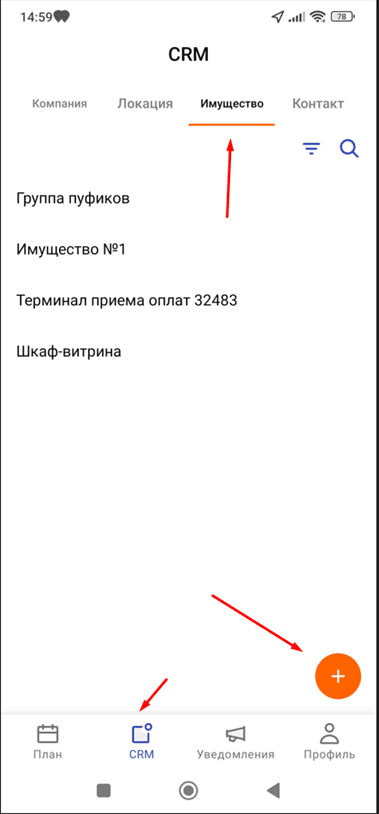
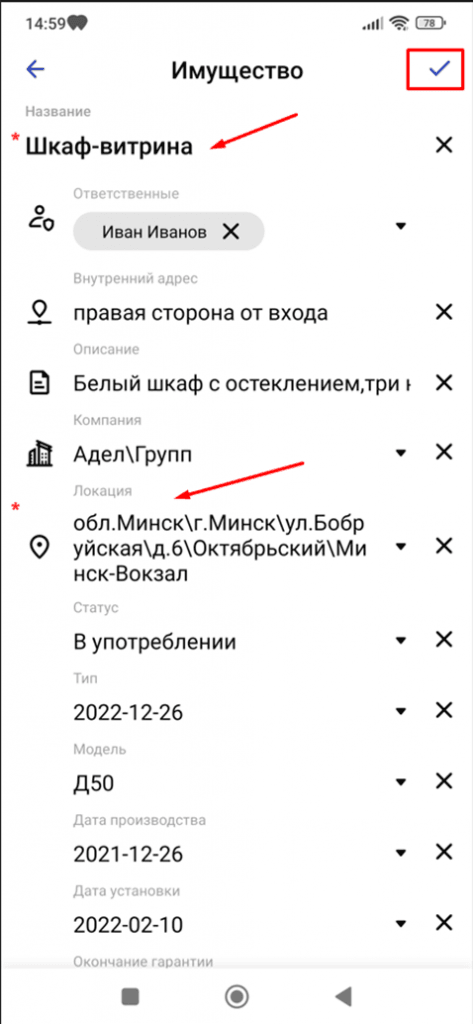
2. Заполните все необходимые атрибуты имущества. Обратите внимание на поля, помеченные красной *. Данные поля обязательны к заполнению. Без заполнения данных полей сохранить информацию об имуществе невозможно. После того, как информация внесена, нажмите на галочку в правом верхнем углу. Имущество отобразится в списке на вкладке CRM.
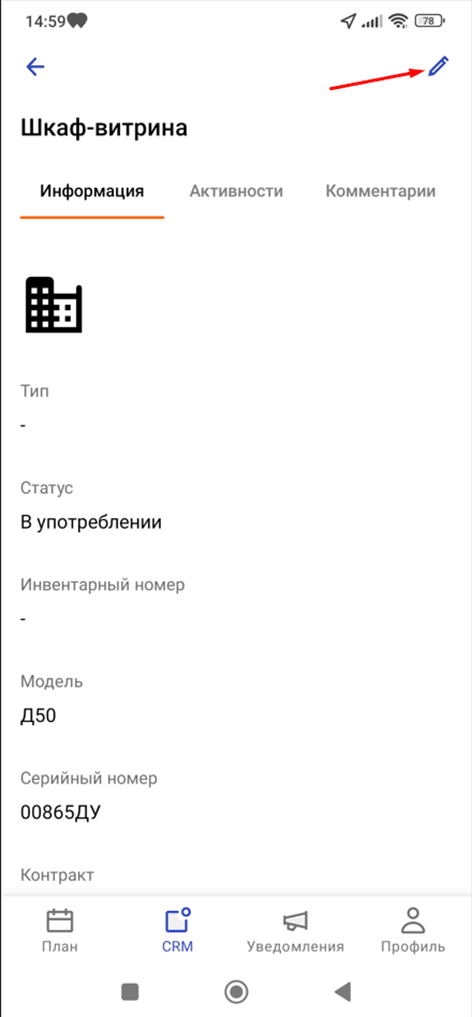
3. Выбрав из списка необходимое имущество, вы можете просмотреть информацию и отредактировать данные. Если опция редактирования доступна вам согласно роли, в правом верхнем углу будет находиться кнопка Карандаш.
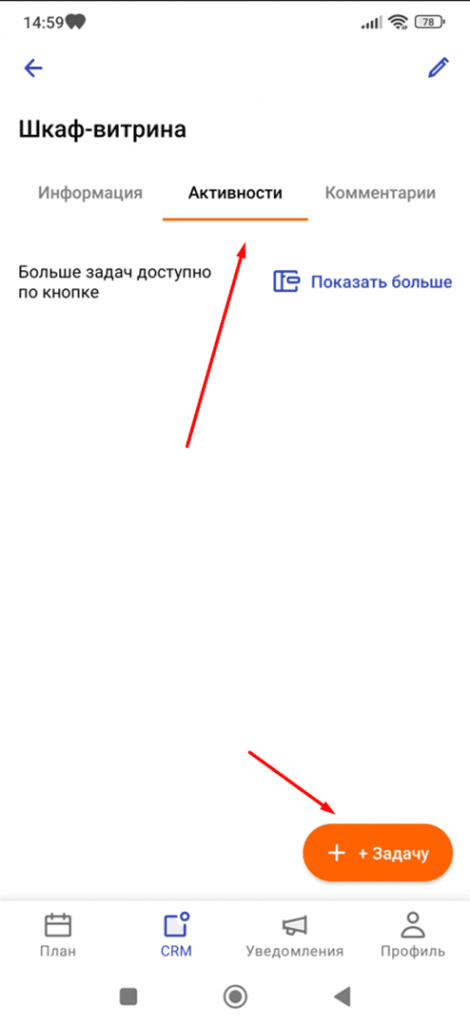
4. На вкладке “Активности” есть возможность поставить задачу, связанную с имуществом. Для создания задачи кликните по кнопке +Задачу.

Нужна информация, помощь с продуктом? Напишите нам!
Автоматизация контроля и работы мобильных сотрудников по всей Беларуси: Минск, Гомель, Гродно, Брест, Витебск, Могилев
Copyright © 2025. Все права защищены.

| Cookie | Duration | Description |
|---|---|---|
| cookielawinfo-checkbox-advertisement | 1 year | Set by the GDPR Cookie Consent plugin, this cookie is used to record the user consent for the cookies in the "Advertisement" category . |
| cookielawinfo-checkbox-analytics | 11 months | This cookie is set by GDPR Cookie Consent plugin. The cookie is used to store the user consent for the cookies in the category "Analytics". |
| cookielawinfo-checkbox-functional | 11 months | The cookie is set by GDPR cookie consent to record the user consent for the cookies in the category "Functional". |
| cookielawinfo-checkbox-necessary | 11 months | This cookie is set by GDPR Cookie Consent plugin. The cookies is used to store the user consent for the cookies in the category "Necessary". |
| cookielawinfo-checkbox-others | 11 months | This cookie is set by GDPR Cookie Consent plugin. The cookie is used to store the user consent for the cookies in the category "Other. |
| cookielawinfo-checkbox-performance | 11 months | This cookie is set by GDPR Cookie Consent plugin. The cookie is used to store the user consent for the cookies in the category "Performance". |
| CookieLawInfoConsent | 1 year | Records the default button state of the corresponding category & the status of CCPA. It works only in coordination with the primary cookie. |
| viewed_cookie_policy | 11 months | The cookie is set by the GDPR Cookie Consent plugin and is used to store whether or not user has consented to the use of cookies. It does not store any personal data. |
| Cookie | Duration | Description |
|---|---|---|
| pll_language | 1 year | The pll _language cookie is used by Polylang to remember the language selected by the user when returning to the website, and also to get the language information when not available in another way. |